TopFiveFind may earn from qualifying purchases. Rankings are editorial starting points, not hands-on test claims.
Home/Vacuum Sealers/Logitech MX Brio Ultra HD 4K Webcam with Noise Reducing Microphones, AI-Enhanced Image Quality, Privacy Protector and USB-C Connection - Graphite
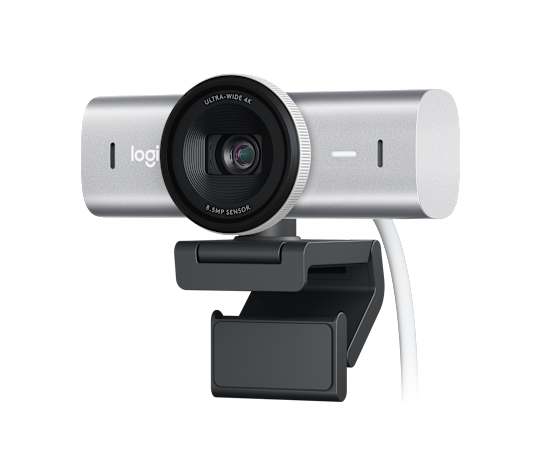
Logitech MX Brio Ultra HD 4K Webcam with Noise Reducing Microphones, AI-Enhanced Image Quality, Privacy Protector and USB-C Connection - GraphiteProduct image from current catalog data
Best Overall Video-Call Upgrade

Logitech MX Brio Ultra HD 4K Webcam with Noise Reducing Microphones, AI-Enhanced Image Quality, Privacy Protector and USB-C Connection - Graphite

By Logitech

9.8Excellent matchFeature and use-case score

The MX Brio is the webcam Logitech built specifically for people who spend their day on Teams and Zoom rather than streaming to Twitch, and it shows in the feature list.

  • Sony STARVIS 1/2.8-inch sensor with 1.45μm pixels
  • 4K at 30fps or 1080p at 60fps, 90-degree diagonal FOV
  • Closed-loop autofocus with RightSight auto-framing
See Price at the store →Price, delivery, and configuration can change at the retailer.
ByTopFiveFind Research Desk

How this was made: AI-assisted research and drafting organize the evidence. Exact product identity, source claims, owner-feedback patterns, conflicts, and publication checks are documented before indexing. No hands-on or human-expert testing is claimed unless a page explicitly shows that evidence. Read the full methodology.

Best fitBest Overall Video-Call Upgrade
CategoryVacuum Sealers
BrandLogitech
Catalog score9.8 / 10

Product overview

Logitech MX Brio: What to Know

Logitech's spec sheet for the MX Brio lists a Sony STARVIS sensor (model IMX415, 1/2.8-inch) with 1.45-micrometer pixels, a 90-degree diagonal field of view, and dual beamforming microphones tuned to cut background noise. Maximum output is 4K at 30fps or 1080p at 60fps over USB-C, the classic tradeoff on nearly every high-resolution webcam, since higher resolution and higher frame rate compete for the same USB bandwidth, not a flaw unique to this model.

What separates the MX Brio from a generic 4K webcam is the software layer. Logitech's RightSight auto-framing keeps you centered as you move, and the camera uses closed-loop autofocus that Logitech and independent reviewers describe as fast to reacquire a face after you shift position, a genuinely useful trait for anyone who talks with their hands or leans back in a chair mid-call.

Logitech markets 'AI-enhanced image quality' and improved low-light handling versus the older Brio 4K, citing larger pixels for better light gathering. That's a real, physical spec difference (bigger pixels do collect more light), but exactly how much better a room looks under your specific lighting is not something we can verify from a spec sheet, treat it as a plausible improvement, not a guaranteed result.

A built-in privacy shutter, a detachable USB-C cable, and a tripod-compatible mount round out the hardware, and Logi Tune software exposes manual controls (zoom, pan, tilt, HDR toggle) if you want more control than the defaults.

Key Listed Features

01

Sony STARVIS 1/2.8-inch sensor with 1.45μm pixels

02

4K at 30fps or 1080p at 60fps, 90-degree diagonal FOV

03

Closed-loop autofocus with RightSight auto-framing

04

Dual beamforming mics, USB-C, built-in privacy shutter

Buying questions

Quick Answers

Is the MX Brio the same as the older Logitech Brio 4K?

No — it's a newer, separate model with a different sensor, larger pixels, and updated software features like RightSight framing; Logitech markets it as a meaningful step up from the original Brio, not a rebrand.

Does the MX Brio work on Chrome OS or Linux?

Logitech lists Windows, macOS, Chrome OS, and Linux compatibility for basic UVC webcam functionality, though some AI/software features are Windows- and macOS-focused.